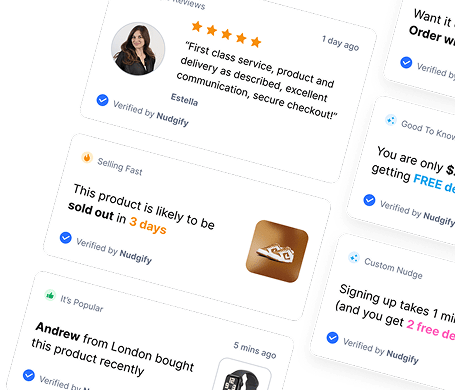
You can give any popup Nudge its own look by describing it. Colours, shape, fonts and motion. Type something like "black pill with white text that slides up" and the design is made for you.
There are two ways to do it.
Who can use it
Custom AI designs are on the Plus, Genius, Agency and Enterprise plans, billed monthly or yearly. They are not part of the Free or Lite plans, lifetime plans or the free trial.
Option 1: Design inside Nudgify
- Open a campaign and click a popup Nudge to edit it.
- Find Design with AI under the preview.
- Describe the look you want and click Create design.
- Check the preview. Ask for changes until you like it.
- Click Save. Nothing goes live until you save.
You get 20 AI designs a month. Every request that makes a design counts as one, and the count resets on the 1st.
Need more? When you are running low, the account owner can get 25 extra designs for $5 right from the Design with AI box. Extra designs do not expire, and they are only used once your monthly ones are gone. This add-on is for accounts that pay by card.
Or use your own Claude, which has no limit. See Option 2.
To go back, click Back to standard design and save.
Option 2: Use your own Claude (unlimited)
If you use Claude, you can connect it to Nudgify and ask it to design your popups. There is no monthly limit and you do not need an API key. You sign in to Nudgify once and that is it.
Connect Claude to Nudgify
- In Claude, open Add custom connector. In the desktop app it is under Plugins, then Add. On claude.ai it is under Settings, then Connectors.
- Name it Nudgify and paste this address:
https://api.nudgify.com/mcp - Click Connect. A Nudgify page opens. Log in if asked, then click Allow.
That's the setup done. You only do it once.
Ask for a design
Start a new chat in Claude and say what you want. For example:
- "List my Nudgify campaigns."
- "Give my recent purchase popup a dark background, rounded corners and a slide in."
- "Make it match my brand. Navy background, gold highlights, serif font."
- "Go back to the standard design on that popup."
Claude saves the design straight to the popup. It shows on your site in about a minute. Reload the Nudge editor in Nudgify to see it in the preview.
Good to know
- A custom design starts from a plain white card. It replaces the Nudge's design template and your site's style settings (theme, rounding, border and colour) for that one Nudge.
- Designs change how a Nudge looks. They cannot change the text, add images or move the Nudge to another spot on the page.
- Each popup Nudge has its own design. Other Nudges keep their look.
- Custom connectors are a Claude feature. If you do not see the option, check that your Claude plan includes connectors.
Stuck? Message us from the chat in your Nudgify dashboard and we will help you set it up.