All posts

Nudges have always come in a few set designs. You picked one, set a colour, and that was your popup.
That works, but your store doesn't look like everyone else's store. Now your Nudges don't have to either.
You can design a popup Nudge by describing it. Type the look you want and AI builds it for you.
Boost Your Conversion Instantly with Nudgify: Turn your website visitors into customers with real-time Social Proof and FOMO Nudges. Get Started Now →
What it looks like
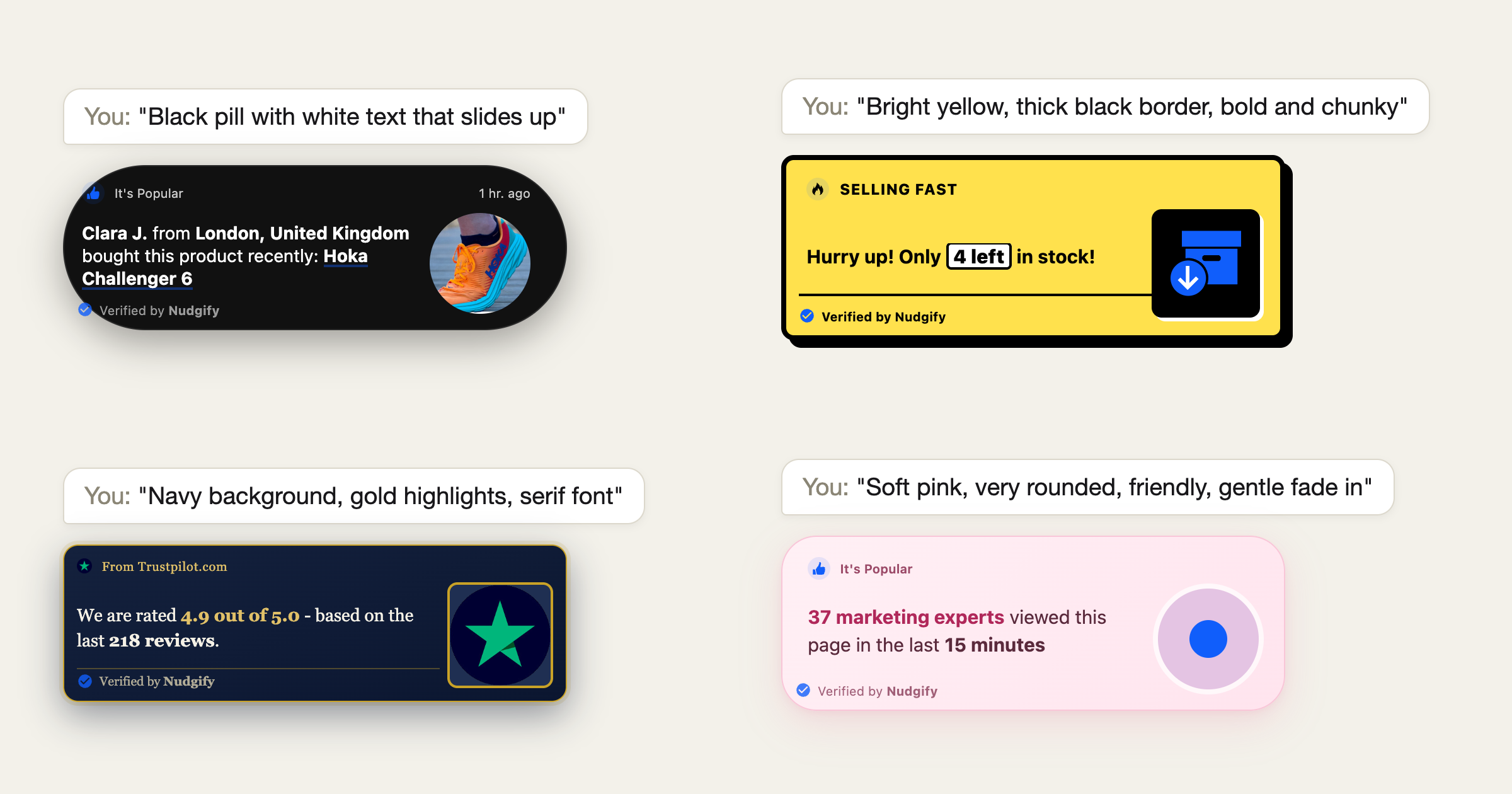
Each popup in the picture above was made with one sentence. These are the real results, nothing touched up.
- "Black pill with white text that slides up"
- "Bright yellow, thick black border, bold and chunky"
- "Navy background, gold highlights, serif font"
- "Soft pink, very rounded, friendly, gentle fade in"
You can ask for colours, shape, fonts, shadows and motion. If the first try is close but not right, say what to change. "Rounder corners." "Make the name gold." It keeps the design and adjusts it.
How to use it
- Open a campaign and click a popup Nudge to edit it.
- Find Design with AI under the preview.
- Describe the look you want and click Create design.
- Check the preview. Ask for changes until you like it.
- Click Save.
Nothing goes live until you save. If you change your mind, click Back to standard design and you are where you started.
Each Nudge has its own design, so your sales popup and your low stock popup can look different.
Increase Trust & Sales with Social Proof
Boost trust, engagement, and conversions with Social Proof — tailored for any industry and easy to integrate. Seamlessly manage client access with our team portal.


Who gets it
Custom AI designs are on the Plus, Genius, Agency and Enterprise plans, on monthly or yearly billing. They are not part of the Free or Lite plans, lifetime plans or the free trial.
You get 20 AI designs a month. If you run low, the account owner can add 25 more for $5. Those don't expire.
Use your own Claude for unlimited designs
If you already use Claude, you can connect it to Nudgify and ask it to design your popups from there. There is no monthly limit and no API key. You add Nudgify as a connector, log in once, and say what you want:
"Give my recent purchase popup a dark background, rounded corners and a slide in."
Claude saves the design to the popup and it shows on your site about a minute later.
The setup takes three steps. They are in the guide: Design Your Nudges With AI.
A few things to know
- A custom design changes how a Nudge looks. It can't change the text, add pictures or move the Nudge to another spot on the page.
- It replaces the design template and your site's style settings for that one Nudge. Your other Nudges keep their look.
- This is for popup Nudges. Inline Nudges are not included yet.
Try it
Log in, open a popup Nudge, and tell it what to wear.

Increase your sales and sign-ups by up
to 15% from $9/mo. only with our Social Proof & FOMO App
Add to Shopify